
From Missed Call to Booked Estimate: Building Voice-Triggered Lead Qualification & Dispatch Workflows with No-Code AI
A step-by-step guide explaining how roofing, HVAC, and pest control businesses can build voice AI workflows using n8n, Vapi, and Twilio to eliminate missed calls.
In the high-stakes world of field services—where roofing, HVAC, plumbing, and pest control businesses compete in local markets—speed is the ultimate currency. When a homeowner experiences a sudden roof leak or a broken AC in the middle of summer, they will not wait. If their call rings out to voicemail, they simply hang up and dial the next competitor on Google.
Industry data reveals a painful reality: up to 62% of inbound calls to small-to-medium field service businesses go unanswered, particularly during peak hours, weekends, or when crews are on-site. For a growing contractor, this missed-call leakage directly translates to thousands of dollars in lost weekly revenue.
At Axontick, we specialize in helping businesses solve these bottlenecks. Drawing from our success deploying systems like our 24/7 AI Voice Agent for Pest Control Business and our Customer Follow Up Automation case studies, this step-by-step guide shows you how to build a voice-triggered lead qualification and automated dispatch workflow using visual, no-code AI tools like Vapi, n8n, and Twilio.
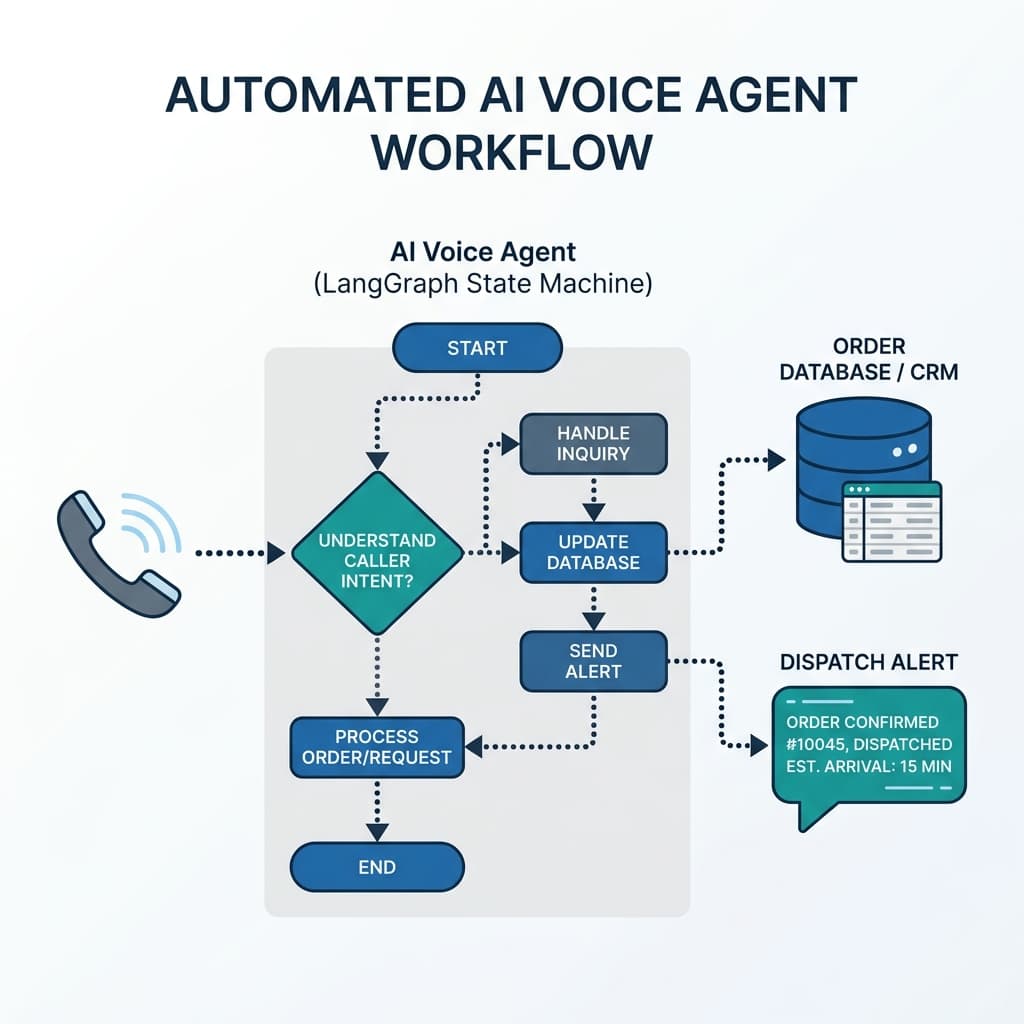
The Visual Blueprint: Drag-and-Drop Inbound to Dispatch
You don't need a degree in software engineering or lines of custom code to build a production-grade dispatch agent. By combining visual platforms, we can build a three-tiered automation pipeline:
- The Front-Desk Ingestion (Vapi / Retell AI): An easy-to-configure voice interface that answers calls on the first ring, holds natural conversations, and extracts structured data.
- The Logic Router (n8n / Make.com): A visual canvas where you build rules (such as checking if a lead is in your service area or determining the urgency of the problem) using flowchart-like nodes.
- The Action Layer (Twilio SMS & CRMs): Automatically creates the job record in your CRM (e.g., ServiceTitan, Housecall Pro, or HubSpot) and texts the nearest technician.
"Automation is no longer reserved for enterprise software teams. With visual builders, any business operations director can design a self-correcting dispatch system in an afternoon."
Step 1: Build Your AI Receptionist in Vapi or Retell AI
Vapi and Retell AI are visual, high-level platforms designed to deploy lifelike voice assistants. Instead of coding audio stream connections, you configure your agent using a dashboard interface.
1. Define the Voice & Persona
Choose an ultra-realistic voice model (like those from ElevenLabs or Play.ht). Set the temperature lower so the agent stays on-topic, professional, and friendly.
2. Write the System Prompt
Instruct the voice agent to act as a front-desk coordinator. Give it a clear checklist of information to collect:
- Caller name and callback number
- The physical address needing service
- A description of the issue (e.g., "roof leak," "clogged drain," "AC blow out")
- Urgency level (e.g., "Is water actively dripping?" or "Is this a routine maintenance request?")
3. Add Structured Output Variables
In the Vapi dashboard, define the custom variables the agent should extract. The visual editor allows you to configure JSON fields (like customer_name, service_address, and issue_description) that automatically structure the call transcript when the customer hangs up.
Step 2: Orchestrate Business Rules on the n8n / Make.com Visual Canvas
Once the call ends, Vapi sends a data payload to your workflow coordinator. Rather than writing code loops, we build our decision logic visually in n8n or Make.com.
1. The Webhook Trigger Node
Create a workflow that starts with a Webhook node. Copy this webhook URL and paste it into Vapi's "End of Call Webhook" setting. Every time a call finishes, the data is pushed onto your canvas.
2. The Zoning Filter (Google Maps Node)
Add a Google Maps API node to verify the address. The node takes the service_address variable and returns the zip code. We follow this with a simple **Switch / Router Node** containing a list of your serviced zip codes. If the customer lives outside your boundaries, the workflow routes them to a polite rejection email or general inquiry queue.
3. The Urgency Grader (AI Router Node)
Drag an **OpenAI/Anthropic Node** onto your canvas. Pass the caller's issue description and ask the model to return a score from 1 to 10. If the caller says, "There is a minor water stain from last year," it scores it a 2. If they say, "My ceiling is actively dripping and bowing in the living room," it scores it a 9.
We connect this to another visual **Router Node**:
- Urgency >= 8 (Emergency): Route to the instant dispatch and SMS alert path.
- Urgency < 8 (Routine): Route to the standard CRM logging path for follow-up during regular business hours.
Step 3: Connect to Your CRM & Booking Software
No-code platforms provide pre-built integrations for industry-standard CRMs like **ServiceTitan**, **HubSpot**, **Salesforce**, or **Google Sheets**. You simply drag the CRM node onto the canvas, log in to authenticate the connection, and map the fields using a visual drag-and-drop builder:
- Map the Vapi
customer_nameto the CRM *Contact Name*. - Map the Google Maps verified address to the *Service Location*.
- Attach the full call transcript and AI summary directly to the *Notes* section.
Step 4: Dispatch the Technician via Twilio SMS
For urgent emergencies, we need to alert the team immediately. Drag a **Twilio Node** onto the "Emergency" path of your n8n canvas and select the **Send SMS** action. You can format the message using visual variables:
[URGENT DISPATCH ALERT]
Name: {{ $json.customer_name }}
Phone: {{ $json.phone_number }}
Address: {{ $json.service_address }}
Issue: {{ $json.issue_description }}
Urgency Score: {{ $json.urgency_score }}/10

Reply 'ACCEPT' to claim this job or click here: https://dispatch.axontick.com/claim/{{ $json.call_id }}
When the technician replies, another simple webhook updates the CRM job record to "Dispatched" and sends a text to the customer letting them know that help is on the way. The entire process—answering the call, qualifying the lead, validating the location, scoring the emergency, logging the CRM ticket, and dispatching a technician—occurs in under 90 seconds without a single human staff member lifting a finger.
Building Your Automated Growth Engine
Leveraging high-level no-code tools puts the power of AI directly in the hands of business operations. By using Vapi for natural voice ingestion and n8n for logical routing, field service contractors can secure their boundaries against missed calls and ensure that emergency work is dispatched instantly.
At Axontick, we build custom, robust AI voice agents and automate critical business workflows to help you scale. If you are looking to deploy a tailored lead capture system that connects to your existing setup, explore our custom AI Voice Agents and Workflow Automation offerings, or book a free 30-minute strategy call with our team to map out your architecture.

Muhammad Asim
Founder @ Axontick
Founder of Axontick, specialized in AI automation, Multi-Agent Systems, and enterprise-grade voice agents. Expert in bridging the gap between complex AI technology and practical business solutions.