A tactical troubleshooting guide and prompt engineering blueprint for marketing teams creating commercial visual assets with Google Gemini.
To solve how to generate image using ai when Google Gemini produces distorted, generic, or off-brand outputs, marketing teams must stop using conversational descriptions and deploy structured directive prompts. High-yield commercial generation requires five explicit parameters: Subject Specifier, Surface/Staging, Camera Perspective, Lighting/Palette, and Strict Boundary Constraints. By feeding Gemini defined scene boundaries rather than open-ended dialogue, you eliminate model hallucination and produce commercial-grade ad creatives, product staging assets, and enterprise illustrations on the first attempt.
Marketing leaders no longer question the efficiency of generative models. According to HubSpot's State of Marketing Survey, 73% of marketing teams now leverage generative AI for asset ideation and creative workflows. Yet creative directors and performance marketers regularly hit an operational wall when trying to generate production assets inside conversational interfaces like Google Gemini.
Instead of clean, studio-lit hero shots, Gemini frequently returns surreal stock visuals, unreadable melted typography, cluttered backgrounds, or deformed hands. When marketers attempt to fix these errors through follow-up chat messages, the visual quality typically degrades further.
This guide diagnoses the core failure mechanics of Google Gemini's image pipeline, outlines a repeatable 5-element prompting framework, provides copy-paste Before vs. After commercial prompt transformations, and routes your team to battle-tested templates.
Conversational follow-ups in chat interfaces trigger full image re-synthesis rather than localized inpainting. Always treat marketing asset creation as a stateless execution: refine your master prompt string rather than asking the chat model to tweak previous attempts.
Why Gemini Image Generation Prompts Fail for Marketing Teams
When creative teams encounter poor visual outputs, the natural instinct is to blame the underlying diffusion model. However, diagnosing production failures requires understanding how Google Gemini interprets multimodal requests.
When designing production-grade gemini image generation prompts, marketing engineers must account for how Gemini handles conversational reasoning and image synthesis through tightly integrated pathways. While this architecture allows natural back-and-forth dialogue, it introduces three major friction points for commercial marketing assets.
1. Conversational Prompt Drift and Generational Loss
The single largest trap in Gemini is the multi-turn conversational loop. When a marketer generates an image and responds with "Make the background darker and remove the coffee cup," Gemini does not selectively edit existing pixel layers.
Instead, the model re-synthesizes the entire composition from scratch while attempting to parse the entire conversation history. With each conversational turn, context tokens bleed together. Details that worked in turn one (such as product proportions or focal symmetry) get scrambled, resulting in severe generational degradation.
The Fix: Treat every marketing asset generation as a stateless execution. When an output misses the mark, do not ask Gemini to "tweak it" in chat. Adjust the master prompt string directly and run a clean generation pass.
2. Vague Subject Specifiers and Default Stock Drift
Diffusion models operate on probabilistic patterns trained across billions of image-text pairs. When a prompt specifies an under-defined subject such as "a modern workspace," Gemini defaults to the statistical center of that concept.
In commercial terms, the statistical center of generic business imagery is clichéd corporate stock photography: fluorescent lighting, artificial smiles, unnatural poses, and cluttered desks.
The Fix: Over-index on physical materials, geometric dimensions, and industrial styling. Replace "a modern office desk" with "a matte walnut executive table, chamfered edge, minimalist workstation with brushed aluminum hardware."
3. Missing Lens and Lighting Constraints
Conversational models do not assume commercial studio hardware unless explicitly instructed. Without concrete camera directives, Gemini chooses arbitrary wide-angle lenses that warp vertical perspective lines and introduce fisheye distortion on product edges.
Furthermore, unguided lighting defaults to flat, omnidirectional illumination that washes out product textures and flattens marketing visuals.
The Fix: Always specify an optical focal length (e.g., 85mm prime lens, isometric orthographic view, 45-degree high-angle product perspective) and define the key light source (e.g., directional softbox rim lighting with soft ambient occlusion shadows).
The Anatomy of a High-Yield Marketing Prompt
Mastering commercial visual synthesis across enterprise marketing workflows requires replacing conversational prose with an explicit prompt blueprint.
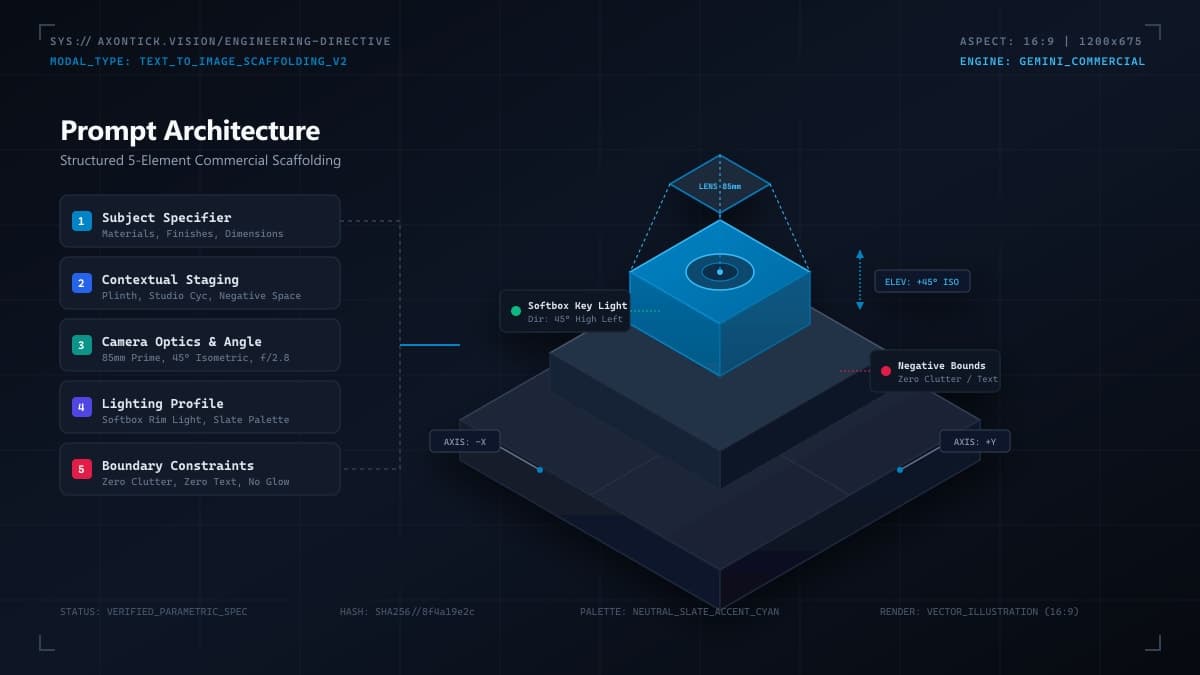
Every production-ready prompt fed into Gemini must contain five structured blocks. This framework eliminates ambiguity and forces the model to respect commercial branding parameters.
[Subject Specifier] + [Surface & Staging] + [Camera Perspective & Lens] + [Lighting & Color Palette] + [Strict Boundary Constraints]Element 1: Subject Specifier (Core Focus)
Name the primary object with meticulous physical detail. Define materials (anodized aluminum, matte polycarbonate, frosted tempered glass), color codes, textural finishes, and dimensional scale. Never let Gemini guess the physical properties of the product or hero subject.
Element 2: Surface and Contextual Staging
Anchor the subject in a clean, intentional physical environment. Specify the grounding surface (monolithic concrete plinth, travertine stone block, seamless studio backdrop, minimal architectural ledge). Specify the negative space required for future marketing typography or logo overlays.
Element 3: Camera Perspective and Framing
Dictate how the camera sees the subject using professional photographic terminology:
- Perspective: Eye-level straight-on, 45-degree three-quarter isometric, macro close-up, or flat lay top-down.
- Optics: 85mm portrait telephoto lens, shallow depth of field (f/1.8), sharp foreground focus with gentle background blur (bokeh).
- Framing: Centered hero composition with 40% negative breathing room on the left third for headline copy.
Element 4: Lighting Profile and Color Palette
Lighting defines the emotional resonance and perceived premium quality of commercial creative:
- Light Quality: Diffused dual-softbox key light, subtle rim accent edge lighting, natural architectural window illumination with soft shadow gradients.
- Palette Control: Neutral slate-gray and charcoal backgrounds paired with specific brand accents (e.g., deep cobalt blue or muted emerald), avoiding saturated neon blooms.
Element 5: Strict Boundary Directives
Because Gemini's web and API interfaces lack a dedicated negative prompt text field, boundary directives must be baked into the body of the prompt using positive exclusionary language.
Instruct the model directly on what the scene must exclude: "Clean seamless scene, completely empty background, zero text or typography, zero watermark, zero decorative clutter, pristine commercial studio setting."
4 Real-World Gemini Fixes: AI Image Prompts for Marketing
To demonstrate how structured engineering fixes broken visual assets, review these four real-world commercial marketing scenarios. Each scenario features a typical failing conversational prompt paired with an enterprise-ready prompt directive.
1. E-Commerce Product Staging (Podium & Studio)
Marketing Goal: Create a premium hero product render for an e-commerce landing page selling a smart wireless conference microphone.
"Generate a picture of a sleek modern conference microphone on a table for our company website banner. Make it look professional and high quality."
Why It Fails: Defaults to generic office clutter, messy wires, and flat lighting.
"Commercial studio hero photograph of a minimalist cylindrical matte-black conference microphone with a precision-machined aluminum mesh top. The device is centered atop an architectural dark slate pedestal. Background is a seamless neutral charcoal studio wall with subtle ambient gradient. Lighting: dual softbox rim lighting from the upper left, defining crisp metallic bevels, with soft contact drop shadow beneath the base. Camera: 85mm prime lens, eye-level perspective, crisp macro focus on hardware textures, f/2.8 shallow depth of field. Composition leaves upper 30% empty for typography. Zero background clutter, zero cords, zero text, zero distortion."
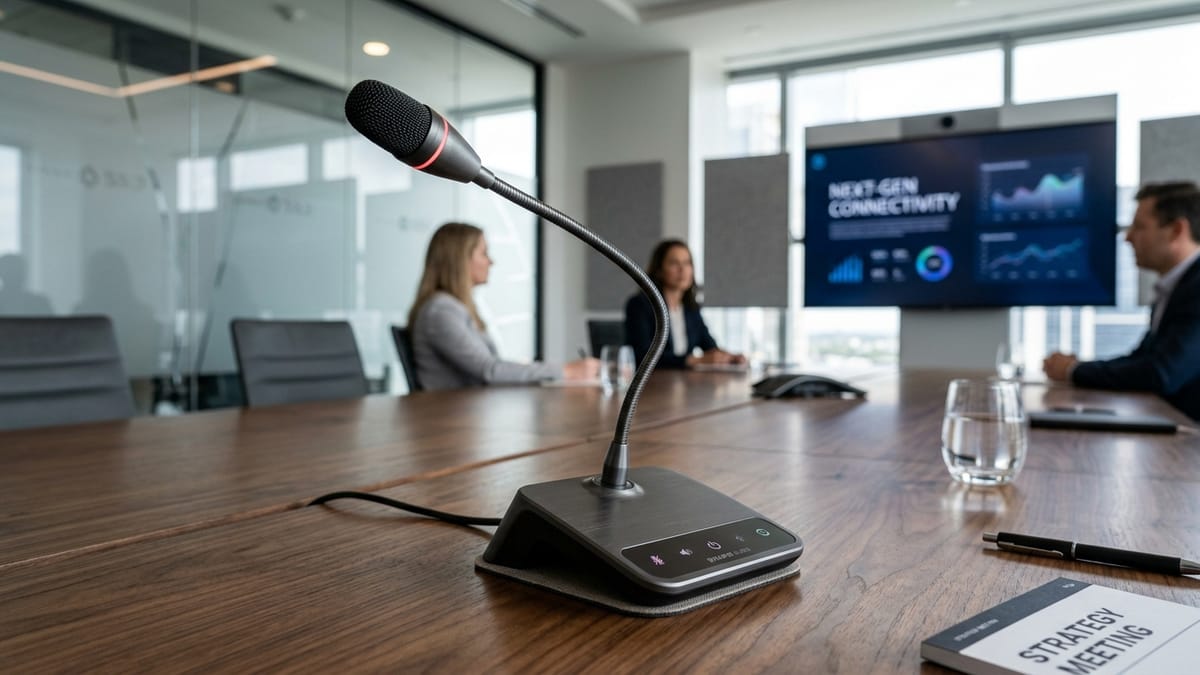
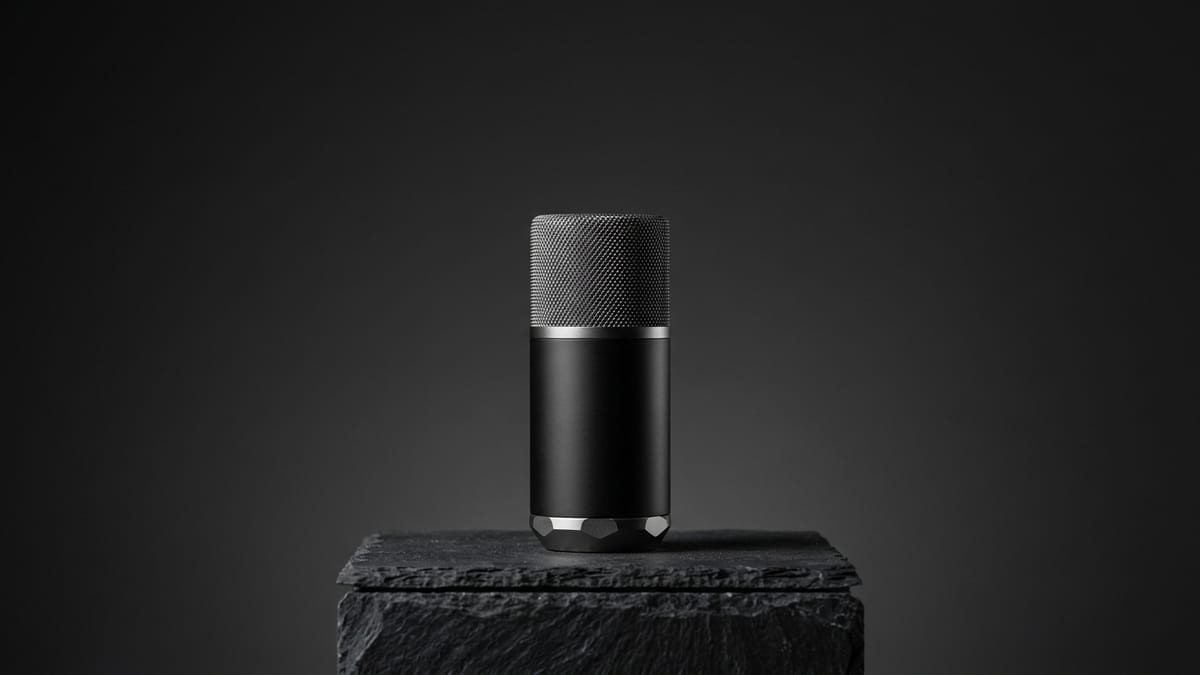
The Result: A pristine, catalog-grade hero visual ready for immediate web banner deployment with high textural fidelity and zero post-processing cleanup required.
2. Multi-Angle Technical Product Showcase
Marketing Goal: Produce technical documentation and feature breakdown collateral for an industrial IoT sensor enclosure.
"Show our industrial sensor from different sides so customers can see what it looks like."
Why It Fails: Shape, ports, and colors mutate between views.
"Synchronized 4-view technical orthographic product showcase sheet of an industrial IoT ruggedized telemetry pod. Matte graphite composite casing with safety-yellow gasket accents and recessed hex bolts. Displayed in an organized 2x2 grid on a clean drafting grid background: Top-left: Front orthographic elevation. Top-right: 90-degree side profile showing mounting bracket. Bottom-left: Top-down plan view. Bottom-right: 45-degree isometric perspective. Consistent scale, uniform studio lighting across all four quadrants, razor-sharp technical product illustration style. Zero human figures, zero annotations, zero perspective distortion between panels."

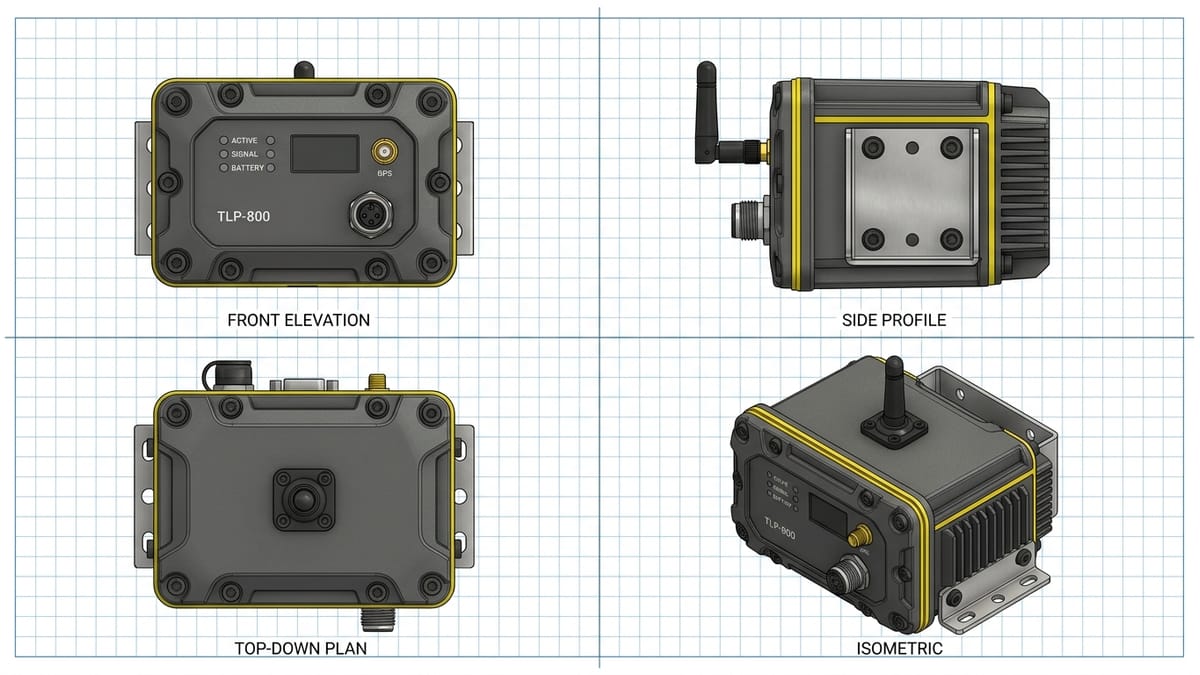
The Result: Consistent, dimensionally stable multi-angle perspectives displaying uniform hardware attributes across all four viewpoints.
3. High-Converting Social Ad Creative Background
Marketing Goal: Generate an eye-catching, distraction-free visual background for a B2B SaaS LinkedIn sponsored campaign advertising enterprise workflow automation.
"An image for a LinkedIn ad about business automation and efficiency with computers and happy business people."
Why It Fails: Uncanny valley human figures and cliché stock office aesthetics.
"Minimalist architectural concept illustration representing digital workflow acceleration. Clean isometric composition displaying geometric modular conduits and sleek glass platforms interconnecting seamlessly. Palette: deep navy base, refined slate gray, with precise electric-cyan accent pipelines routing data flow. Clean directional lighting highlighting crisp architectural bevels. Right half of the frame contains negative dark space optimized for ad headline overlay. Sleek, professional enterprise aesthetic, vector-inspired matte finish, zero human figures, zero text, zero glows, zero lens flare, high visual clarity."


The Result: A sophisticated B2B creative asset that communicates speed and system architecture without the uncanny valley pitfalls of stock human generations.
4. Enterprise Architecture & Service Concept Illustration
Marketing Goal: Build an editorial visual for a whitepaper discussing zero-trust enterprise cloud security.
"Draw a picture showing zero trust cybersecurity protecting cloud servers from hackers."
Why It Fails: Hollywood hacker clichés, glowing neon locks, and green binary code.
"High-level enterprise system architecture illustration depicting a multi-layered zero-trust security perimeter. Precision isometric schematic diagram showing clean geometric layers: Identity Verification, Micro-segmentation, and Encrypted Data Vault. Materials: frosted acrylic layers, brushed titanium frames, and matte dark-indigo substrates. Clear directional overhead lighting with crisp drop shadows delineating each defensive tier. Clean negative space on all borders for whitepaper layout framing. Sophisticated technical enterprise infographic style, zero hacker clichés, zero glowing padlocks, zero neon blooms, zero unreadable text."

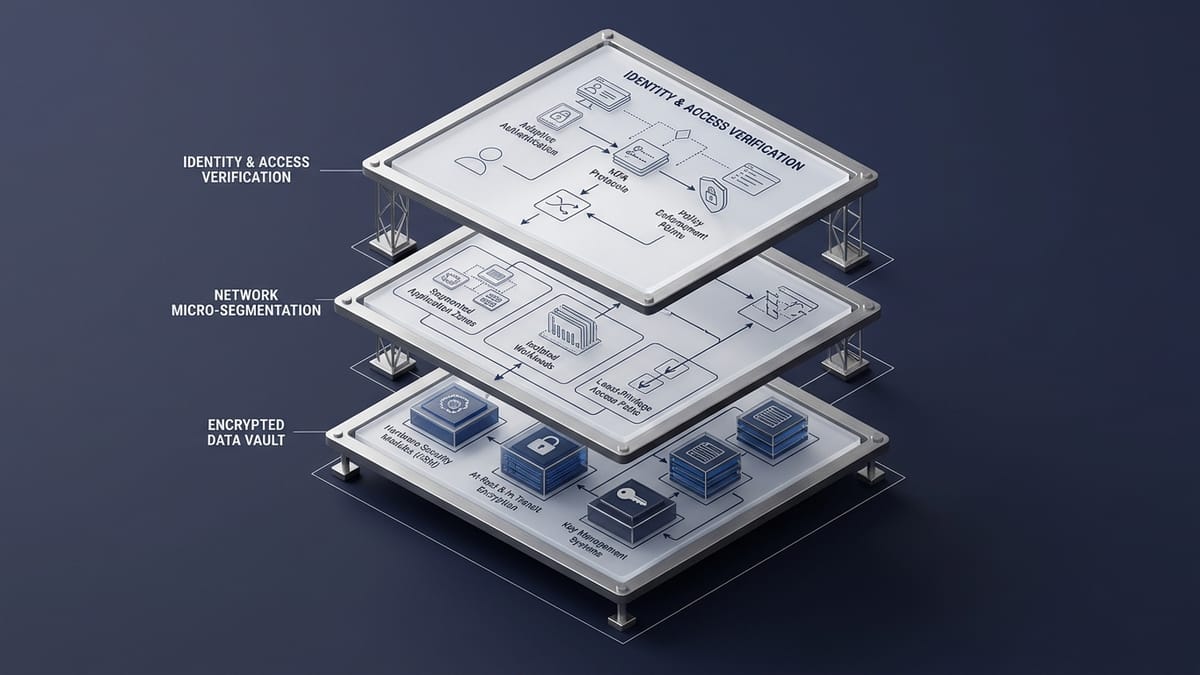
The Result: An authoritative, executive-ready technical diagram that reinforces security credibility rather than diminishing it with consumer tropes.
Gemini Prompt Optimization Matrix
To rapidly diagnose visual errors during campaign production, consult this operational troubleshooting matrix:
| Failure Symptom in Gemini | Root Cause | Engineering Syntax Fix | Production Rule |
|---|---|---|---|
| Melted or misspelled text inside graphic | Diffusion tokenization cannot reliably render complex vector typography | Remove text instructions from prompt; generate clean background plate and overlay copy in Figma/CSS | Never bake typography into generative image layers |
| Inconsistent product colors and materials | Model guesses shader values based on broad linguistic associations | Specify exact physical finishes: "matte powder-coated RAL 7016 anthracite aluminum" | Define concrete tactile materials rather than abstract color names |
| Visual quality drops after conversational turn | Conversational context drift and re-synthesis generational loss | Discard conversation thread; inject refined master prompt into a fresh generation session | Treat image generation as single-turn stateless executions |
| Distorted hands or uncanny human faces | Multi-joint skeletal complexity exceeds diffusion mesh stability | Shift commercial creative to minimalist product staging or clean technical architectural illustrations | Prioritize sleek product isolation and conceptual infrastructure |
| Washed out, flat lighting | Default ambient lighting environment lacks directional contrast | Mandate key/fill setup: "directional 45-degree softbox key with gentle ambient occlusion" | Always specify light source, angle, and shadow behavior |
| Background clutter competing with subject | Inadequate negative space definition | Dictate backdrop explicitly: "monolithic neutral studio cyc with 40% negative breathing room" | Reserve explicit canvas sectors for marketing typography |
Enforcing Brand Consistency and Avoiding Common Pitfalls
For marketing agencies and multi-brand enterprises, producing one good image is insufficient. True operational ROI requires producing hundreds of cohesive assets across quarterly campaigns.
Enforcing visual consistency in Google Gemini requires three system-level controls:
1. Build a Standardized Prompt Wrapper
Never allow team members to prompt Gemini from an empty text box. Create standardized prompt wrappers that lock down camera optics, lighting profiles, and style modifiers across all campaign requests:
[CAMPAIGN WRAPPER PREFIX]
High-end commercial studio product photography. Minimalist architectural aesthetic, 85mm portrait telephoto lens, f/4 aperture, sharp focal plane. Neutral matte slate background.

[DYNAMIC ASSET VARIABLE]
Subject: [Insert Product Name & Specific Materials Here]
Staging: [Insert Surface & Negative Space Allocation Here]

[CAMPAIGN WRAPPER SUFFIX]
Directional softbox key light from high left, soft contact shadows. Pristine studio condition, zero clutter, zero text, zero artifacts.
2. Lock Aspect Ratios Before Scene Generation
Gemini formats output aspect ratios based on initial platform parameters. For social ads (1:1 or 4:5), hero headers (16:9), or mobile stories (9:16), declare the framing orientation explicitly within the opening sentence of the prompt to prevent vital subjects from being cropped during responsive viewport rendering.
3. Separation of Concerns: Image Generation vs. Graphic Design
One of the most persistent errors marketing teams make when discovering ai image prompts for marketing is attempting to make Gemini act as an all-in-one graphic designer.
AI image generation models are rendering engines, not desktop publishing tools. Attempting to force Gemini to generate logos, headlines, badges, and layout buttons in a single pass will consistently fail. Generate pristine, uncluttered visual plates with deliberate negative space, then composite typography and brand marks in your production design tool.
Accelerating Marketing Asset Production with Axontick Prompts
Building production-ready image prompts from scratch requires hours of iterative prompt engineering, lighting calibration, and model stress-testing.
Marketing agencies and high-growth brands streamline this entire workflow by utilizing Axontick's curated library of enterprise prompt directives.
Instead of guessing syntax modifiers, marketing teams leverage pre-calibrated frameworks designed specifically for commercial and product generation:
- Product Showcase Scene Directive: Transform isolated e-commerce product models into high-end editorial commercial showcases set on architectural travertine podiums with calibrated studio lighting.
- Multi-Angle Product Views Framework: Generate unified 4-angle technical orthographic and isometric sheets from a single product reference for catalogs and technical documentation.
- Enterprise Security & Trust Posture Visualizer: Render executive-grade architectural trust illustrations that map compliance layers, zero-trust perimeters, and cloud infrastructure without cheesy stock tropes.
- Explore the Full Axontick Prompt Directory: Access dozens of tested prompts spanning marketing collateral, system architectures, and conversion-optimized ad backgrounds.
Deploying verified prompt architectures cuts creative production turnaround from days to minutes while safeguarding brand consistency across every digital channel.
Frequently Asked Questions
Why does Gemini distort text and faces in marketing images?
Diffusion models generate imagery by predicting pixel noise patterns rather than executing vector typography or anatomical meshes. When asked to render specific words or complex multi-joint human anatomy without exhaustive constraints, the model estimates visual shapes, causing melted text and uncanny facial features. For commercial marketing, generate clean visual plates and apply text programmatically in design tools.
How do I maintain brand consistency across multiple AI images?
Standardize your prompt syntax by utilizing a fixed "prompt wrapper" containing identical camera optics, surface materials, and lighting descriptors across all generations. Keep color palettes constrained to two primary hex-adjacent tones and use positive boundary constraints to prevent random decorative elements from shifting between campaign assets.
What is the most reliable prompt formula for commercial AI product images?
The most reliable formula uses five discrete blocks: Subject Specifier (physical materials and dimensions) + Surface/Staging (pedestal or backdrop) + Camera Perspective (lens and framing angle) + Lighting Profile (softbox direction and shadow gradients) + Strict Boundary Directives (exclusion of clutter and text).
Can marketing businesses commercially use images generated by Google Gemini?
Under Google Workspace and Gemini commercial service terms, commercial use of generated assets is permitted subject to standard platform acceptable use policies. However, businesses must ensure generated assets do not infringe on existing trademarks, copyrights, or proprietary product designs by utilizing original prompt specifications.
Ready to standardize how to generate image using ai across your marketing operations? Explore Axontick's vetted prompt engineering frameworks in our Prompt Directory or consult our technical team to architect custom multimodal generation pipelines for your brand.

Muhammad Asim
Founder @ Axontick
Founder of Axontick, specialized in AI automation, Multi-Agent Systems, and enterprise-grade voice agents. Expert in bridging the gap between complex AI technology and practical business solutions.