Stateful Retries & Evaluation Nodes: Building Self-Correcting AI Agent Workflows with LangGraph
A code-first engineering guide to building self-correcting AI agent workflows using LangGraph. Implement grading, auditing, and stateful routing loops.
Large Language Models (LLMs) are probabilistic machines. While their creative fluency is remarkable, their inherent unreliability makes them challenging to deploy in mission-critical software engineering environments. When building enterprise AI agents, relying on fragile, one-shot prompts is a recipe for failure. If an LLM hallucinates or returns invalid data in a linear pipeline, that error propagates directly to the end user.
To build production-grade AI systems, engineers must design for failure. The most effective pattern for managing LLM unreliability is the Self-Correcting Agent Loop. Instead of a linear flow, we construct a state machine with explicit routing loops that grade, audit, and programmatically force the agent to correct its own output before returning a response. In this technical guide, we will implement this architecture from scratch using LangGraph, Python, and Pydantic.
1. Introduction: Moving Past Linear Pipelines
Standard AI applications typically employ linear pipelines, such as sequential chains or basic Retrieval-Augmented Generation (RAG) flows. In these architectures, the input goes through a retrieval step, a generation step, and then outputs directly to the user. There is no feedback loop. If the vector search returns irrelevant documents, or if the LLM fails to ground its response in those documents, the system fails silently.
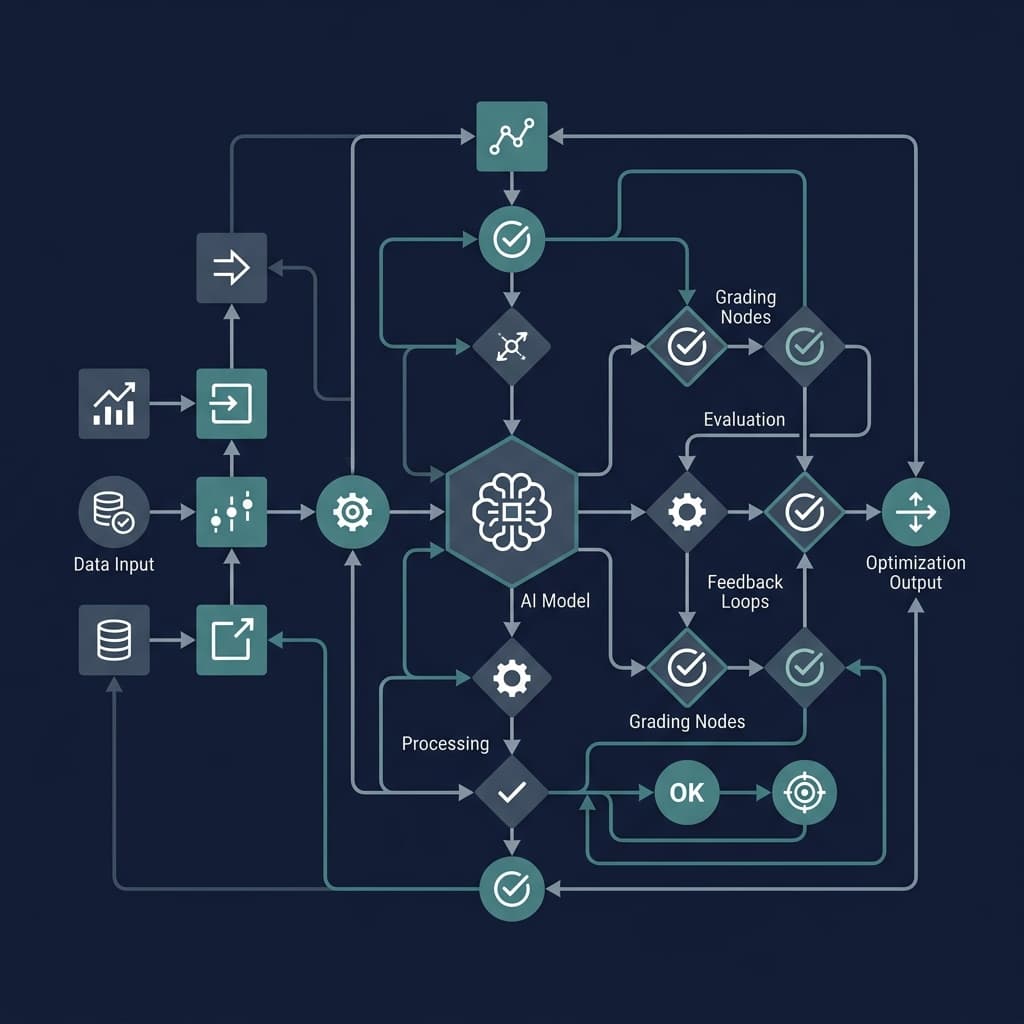
To overcome this, we transition to a state-driven, cyclic reasoning loop. By modeling our workflow as a graph, we can treat each step (retrieval, generation, grading) as a node. The transitions between these nodes are controlled by conditional edges. If a grading node detects a hallucination, the graph routes the control flow back to the generation node, passing the evaluation feedback so the model can self-correct.
2. Step 1: Defining a Unified Agent State
The foundation of any LangGraph workflow is the shared state. The state is represented as a structured object that is passed sequentially through each node. Each node can read from and write updates to this state. We define our state using Python's TypedDict, tracking the user's input, the retrieved source documents, the current generated answer draft, and a safety loop counter to prevent infinite runtime cycles.
from typing import List, TypedDict

class AgentState(TypedDict):
    """
    Represents the shared state of our self-correcting AI agent.
    """
    question: str          # The original user query
    documents: List[str]   # Verified context retrieved from databases
    generation: str        # The generated answer draft
    loop_count: int        # Counter tracking retry cycles to prevent infinite loops
    error_feedback: str    # Description of grading failures to guide correction
Tracking the loop_count is critical. If an LLM enters an adversarial loop where it continuously fails to correct itself, the graph will detect when the loop count hits a pre-defined threshold and route the transaction to a fallback system or a human operator.
3. Step 2: Building Deterministic Grading Sub-Agents
To evaluate our drafts, we must enforce structure on our LLM outputs. Standard natural language outputs are too hard to parse programmatically. By using Pydantic schemas, we can lock down LLM responses to strict JSON formats, enabling deterministic parsing.
We will build two crucial graders: a Relevance Grader (verifying that retrieved documents match the query) and a Hallucination Guard (checking if the generation maps 100% back to the retrieved sources).
from pydantic import BaseModel, Field

# relevance_grader.py
class GradeRelevance(BaseModel):
    """Binary score for relevance check on retrieved documents."""
    binary_score: str = Field(
        description="Relevance score: 'yes' if the document is relevant to the user query, 'no' otherwise."
    )

# hallucination_guard.py
class GradeHallucination(BaseModel):
    """Binary score for hallucination check on generated response."""
    binary_score: str = Field(
        description="Hallucination score: 'yes' if the response is grounded in the documents, 'no' otherwise."
    )
Using libraries like langchain-openai or instructor, we can bind these Pydantic schemas directly to the LLM runtime to guarantee that the evaluation node receives structured data rather than free-form text.
4. Step 3: Mapping Operational Processing Nodes
Now, let's write the executable logic for our core nodes. We will define a mock vector retrieval node and a generation node that utilizes the shared AgentState.
def retrieve_node(state: AgentState):
    """
    Retrieves relevant documents based on the user question.
    """
    print("\n--- [NODE] RETRIEVING DOCUMENTS ---")
    question = state["question"]

    # Mocking a vector DB lookup return
    retrieved_docs = [
        "LangGraph is an orchestration library designed for stateful, multi-actor applications with LLMs.",
        "LangGraph compiles workflows into a state machine using nodes and edges."
    ]

    return {"documents": retrieved_docs, "loop_count": 0}

def generate_node(state: AgentState):
    """
    Generates an answer based on retrieved documents and error feedback.
    """
    print("\n--- [NODE] GENERATING RESPONSE ---")
    question = state["question"]
    docs = state["documents"]
    loop_count = state["loop_count"]
    feedback = state.get("error_feedback", "")

    # In a real app, you would pass the context + error feedback to the LLM.
    # Here, we simulate a hallucination on the first iteration to trigger correction.
    if loop_count == 0:
        generation = "LangGraph is a database framework built on Postgres for vector retrieval."
    else:
        generation = "LangGraph is an orchestration library designed for building stateful, multi-actor AI agent workflows."

    return {
        "generation": generation,
        "loop_count": loop_count + 1
    }
5. Step 4: Coding the Conditional Control Edges
The conditional edges are the decision-making nodes of the state machine. They do not edit the state directly; instead, they inspect the current state values and return a string pointing to the next node to transition to.
We write our edge to verify if the answer is grounded in the source data and check the loop counter boundaries.
def route_after_generation(state: AgentState) -> str:
    """
    Conditional edge that checks for hallucinations and validates output quality.
    """
    print("\n--- [EDGE] RUNNING HALLUCINATION AUDIT ---")
    generation = state["generation"]
    docs = state["documents"]
    loop_count = state["loop_count"]

    # Simple semantic grounding check (mocking Pydantic auditor response)
    # The first iteration output contains 'Postgres', which is not in our source documents.
    is_grounded = "postgres" not in generation.lower()

    if is_grounded:
        print("-> Result: Grounded. Proceeding to completion.")
        return "complete"

    # If hallucination is detected, check safety limits
    if loop_count >= 3:
        print("-> Result: Max retries exceeded. Routing to fallback.")
        return "fallback"

    print(f"-> Result: Hallucination detected! Routing back to Generate. (Retry {loop_count})")
    return "correct_generation"
6. Step 5: Compiling the Workflow Runtime
With our nodes and conditional routing logic ready, we construct the graph structure using LangGraph's StateGraph. We then define a placeholder fallback node for human intervention and compile the graph.
from langgraph.graph import StateGraph, END

def fallback_node(state: AgentState):
    print("\n--- [NODE] ROUTING TO HUMAN FALLBACK ---")
    return {"generation": "I am unable to answer this with high precision. Connecting to a specialist..."}

# 1. Initialize Graph with state schema
workflow = StateGraph(AgentState)

# 2. Register operational nodes
workflow.add_node("retrieve", retrieve_node)
workflow.add_node("generate", generate_node)
workflow.add_node("fallback", fallback_node)

# 3. Define control flow edges
workflow.set_entry_point("retrieve")
workflow.add_edge("retrieve", "generate")

# 4. Bind conditional edges to routing decision
workflow.add_conditional_edges(
    "generate",
    route_after_generation,
    {
        "complete": END,
        "correct_generation": "generate",
        "fallback": "fallback"
    }
)

# 5. Compile graph runtime
app = workflow.compile()
Executing the Graph & Trace Logs
We execute the compiled graph by passing the initial state. Below is an example execution showing the trace logs as the self-correction loop unfolds:
# Running the compiled LangGraph runtime
inputs = {"question": "What is LangGraph?"}
for output in app.stream(inputs):
    for key, value in output.items():
        pass
Terminal Execution Output:
--- [NODE] RETRIEVING DOCUMENTS ---

--- [NODE] GENERATING RESPONSE ---
Draft: LangGraph is a database framework built on Postgres for vector retrieval.

--- [EDGE] RUNNING HALLUCINATION AUDIT ---
-> Result: Hallucination detected! Routing back to Generate. (Retry 1)

--- [NODE] GENERATING RESPONSE ---
Draft: LangGraph is an orchestration library designed for building stateful, multi-actor AI agent workflows.

--- [EDGE] RUNNING HALLUCINATION AUDIT ---
-> Result: Grounded. Proceeding to completion.
By executing these steps, the graph programmatically prevented an incorrect answer about Postgres from ever reaching the user, self-correcting using the feedback loop until a verified, grounded answer was achieved.
Building Resilient Architectures
Deploying AI agents at scale requires moving away from the hope that prompts remain perfect. By designing deterministic state graphs and using Pydantic-based grading sub-agents, you can programmatically catch, grade, and redirect LLM outputs. This ensures your systems act as self-correcting state machines, providing enterprise-grade reliability.
Interested in integrating state-driven AI agents into your business operations? Explore our specialized work on Multi-Agent Systems or read how we built a Zero-Hallucination Healthcare Assistant to see these concepts in action.

Muhammad Asim
Founder @ Axontick
Founder of Axontick, specialized in AI automation, Multi-Agent Systems, and enterprise-grade voice agents. Expert in bridging the gap between complex AI technology and practical business solutions.