
Set up a live Single Truth Board for your heating and cooling crew in under an hour with zero code.
You can build an HVAC dispatch board Airtable Make setup in about 45 minutes by creating four linked tables in Airtable, adding a mobile button view for technicians, and connecting Make.com to send Twilio texts and log timestamps automatically. In our earlier guide on The "Busy but Broke" Trap in HVAC, we showed how scattered notes and group texts cost two billable hours per technician every day. This guide walks you through building that exact live board using simple online tools any office manager can set up.
The Unified No-Code Stack You Need
Many contractors avoid building internal tools because they worry about outgrowing them or needing a developer. Across this 15-day series, we build every workflow onto one connected no-code HVAC dispatch system so nothing ever gets rebuilt from scratch.
You only need four online tools to launch Day 1:
| Tool | Role on Your Shop Floor | Why We Use It |
|---|---|---|
| Airtable | Central database & 4-color Kanban board | Stores jobs, techs, and customers in one live place on desktop and mobile. |
| Make.com | Behind-the-scenes workflow connector | Watches board changes and triggers texts and logs automatically (mirrorable in n8n). |
| Twilio | Company SMS & phone number | Sends reliable "On My Way" texts using one consistent business number. |
| Slack | Internal team & dispatch alerts | Posts your 7:00 AM morning alignment checklist so nothing slips. |
Every future automation in this series—standardized job cards, route zones, van inventory, and curb invoicing—plugs straight into this same Airtable base.
Step 1: Set Up Your Airtable HVAC Job Tracker Base
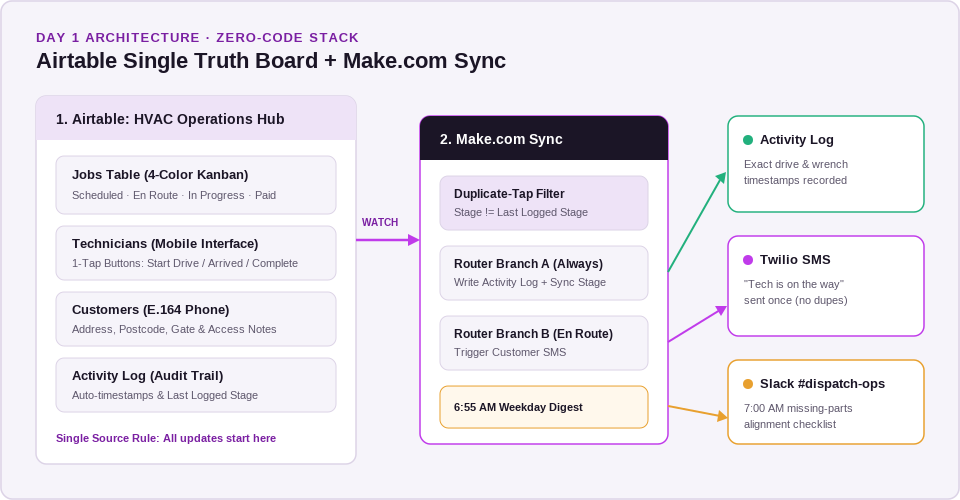
Open Airtable and create a new base called HVAC Operations Hub. Create four linked tabs so information never gets duplicated:
- Customers Table: Store
Customer Name,Phone(in international E.164 format like+447...or+1555...as required by Twilio),Street Address,Postcode, andGate or Access Notes. - Technicians Table: Store
Tech Name,Phone,Primary Zone, andActive Status. - Jobs Table: Add
Job ID(Autonumber),Customer(Link to Customers),Assigned Tech(Link to Technicians),Stage(Single Select),Parts Status(In Stock, On Van, Ordered),Scheduled Window, andLast Stage Change(Last Modified Time watchingStage). - Activity Log Table: Store
Job(Link to Jobs),New Stage,Changed At, andLast Logged Stageto keep an automatic timestamp history.
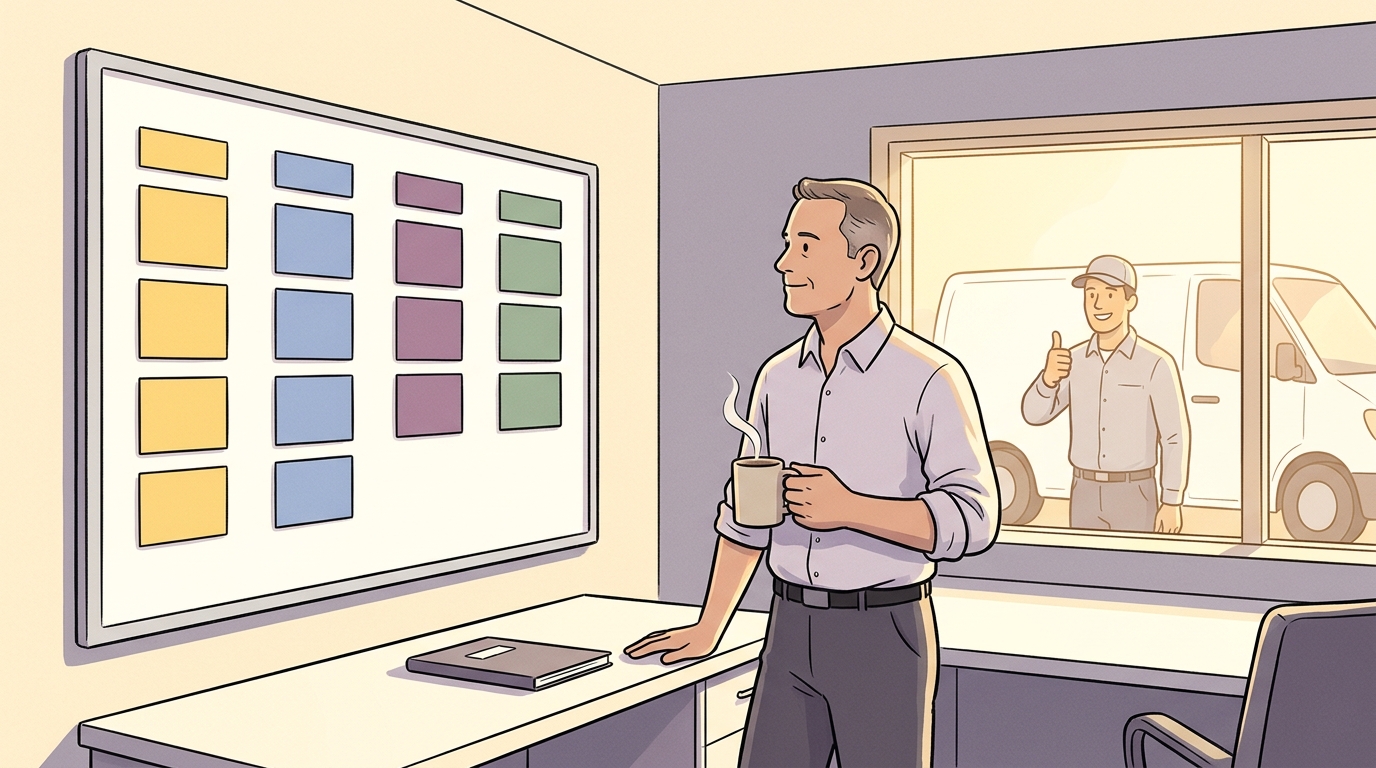
Click the Stage field in Jobs and add four color-coded options: Yellow (Scheduled), Blue (En Route), Purple (In Progress), and Green (Completed & Paid). Switch the view to Kanban grouped by Stage so your dispatcher gets a three-second visual scan of the entire day.
Step 2: Build the 1-Tap Technician Mobile View
Open Airtable Interfaces at the top of your base and create a List view for Jobs filtered by Assigned Tech = Current User and Scheduled Window = Today. Add three large buttons at the top of each job card: Start Drive (En Route), Arrived on Site (In Progress), and Job Complete (Completed & Paid).
Hide billing and admin columns from this mobile screen. When field updates take one tap in the driveway, your crew stops texting the office—reclaiming part of the 50% to 70% of paid shift hours that the Building Engineering Services Association (BESA) reports field techs often lose to non-wrench friction.
Step 3: Wire Make.com Field Service Automation
Create a new scenario in Make.com named Day 1 — Board Sync & Alerts and add four modules:
- Trigger — Airtable (Watch Records): Point it at
HVAC Operations Hub→Jobs, watching theLast Stage Changefield. - Filter — Duplicate Check: Click the wrench icon between modules 1 and 2 and set:
StageNot Equal ToLast Logged Stage. - Router — Split by Stage: Add a Make.com Router with two branches.
- Branch A (Always Runs):
Airtable — Create a Recordlogs the job, new stage, and time inActivity Log, then updatesLast Logged Stageon theJobsrecord. - Branch B (Runs Only When Stage = En Route):Twilio — Send a Messagetexts the homeowner: "Hi [Customer Name], [Tech Name] is on the way and will arrive shortly."
Next, create a second Make.com scenario scheduled for 6:55 AM on weekdays. Search Jobs where Scheduled Window is Today and Parts Status is not On Van, then post that checklist to your #dispatch-ops Slack channel before the 7:00 AM huddle.
Production Guardrails: Preventing Double-Texts & Signal Drops
Real-world driveways and basements are messy, so add three quick safeguards before rolling this out:
| Common Field Pitfall | What Goes Wrong | 1-Minute Fix in Your Setup |
|---|---|---|
| Double-Tap in Weak Signal | Tech taps En Route twice, texting the customer twice. | Keep the Stage != Last Logged Stage Make.com filter active. |
| Failed Twilio SMS | Local phone numbers without country codes fail silently. | Store all numbers in E.164 format (e.g., +44... or +1...). |
| Deep Basement Sync Lag | Airtable mobile needs cellular data to save a tap. | Train techs to tap Start Drive and Job Complete at the van door. |
FAQ & Next Steps
How do you build an HVAC dispatch board in Airtable?
Create one Airtable base with four linked tables: Customers, Technicians, Jobs, and Activity Log. Add a four-color Stage field (Scheduled, En Route, In Progress, Completed & Paid) and switch Jobs to a Kanban view for a three-second daily scan.
How do technicians update job status without texting dispatch?
Use Airtable Interfaces to build a mobile view filtered to today's jobs for the logged-in tech. Add three large buttons—Start Drive, Arrived on Site, and Job Complete—so updates take one tap.
Can Airtable and Make.com replace ServiceTitan for a small HVAC shop?
For a 1-to-10 van shop, Airtable and Make.com deliver custom dispatch tracking and automated SMS alerts without high per-seat fees. Techs should tap buttons near their van rather than in deep basements where signal drops.
Your Single Truth Board is now live. Every job has one home, every tech updates status in one tap, and every stage change logs itself.
Next in Day 2: Stop messy phone notes from reaching this board in Day 2: How to Automate Standardized HVAC Job Cards with Tally & Make.com. Want help wiring this into your shop floor? Explore our HVAC automation solutions to schedule an operations audit.
Want this deployed for your enterprise?
Axontick engineers architect, benchmark, and deploy custom enterprise autonomous systems with guaranteed uptime, sub-second latency, and 100% IP ownership.

Muhammad Asim
Founder @ AxontickFounder of Axontick, specialized in AI automation, Multi-Agent Systems, and enterprise-grade voice agents. Expert in bridging the gap between complex AI technology and practical business solutions.